Supply-chain review
Slopsquatting: check AI-suggested packages before you install them
Slopsquatting registers package names that AI coding tools invent. See what research found, then run a Node.js script that flags missing or brand-new dependencies.
Practice review
Review two synthetic patches in about 5 minutes.
No account. Review-only: it does not inspect your own code.
Try the review exercise8 min read · Updated October 20, 2026
What slopsquatting is
Slopsquatting is registering a package name that AI coding tools tend to invent, so that a developer who installs the suggested dependency gets the attacker's code. It is named after typosquatting, which relies on human typing mistakes instead. Seth Larson, security developer-in-residence at the Python Software Foundation, coined the term in 2025.
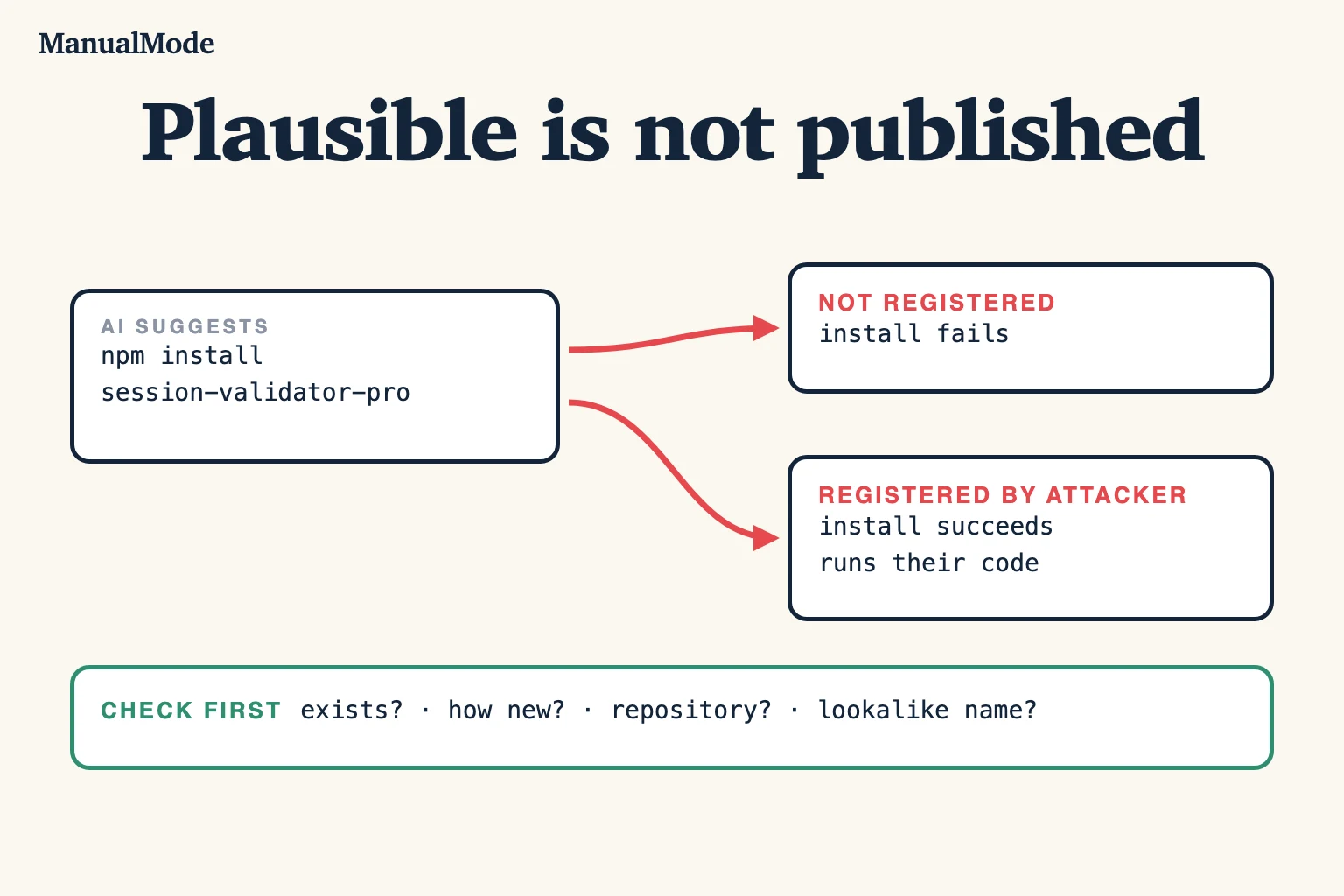
The risk is simple. An assistant writes import and install lines for a package that sounds right but does not exist. If nobody owns that name, installing it fails. If someone has registered it, the install succeeds and runs whatever they published, including install scripts.
How often AI tools invent packages
The largest public measurement is “We Have a Package for You!” by Spracklen and colleagues, accepted at USENIX Security 2025. The authors generated 576,000 code samples with 16 code-generating models in two languages and checked every referenced package.
- The average share of hallucinated packages was at least 5.2% for commercial models and 21.7% for open-source models.
- They collected 205,474 unique hallucinated package names.
Those numbers describe the models and prompts in that study, not every tool you use today. They are enough to make the point: an unfamiliar package name in generated code is a claim to check, not a fact. Larson has also noted that the number of real installs of hallucinated names is hard to measure without data from model providers.
Check one suggested package by hand
Before running an install command an assistant wrote, look the package up. Two commands cover npm and PyPI:
# npm: does it exist, how old is it, where is the source?
npm view <name> name version time.created repository.url

# PyPI: 404 means the project does not exist
curl -s -o /dev/null -w "%{http_code}\n" https://pypi.org/pypi/<name>/json
A missing package is the easy case: the name does not exist yet, so do not install it and find the real library. The harder case is a package that exists but was created very recently, has no repository link, has almost no downloads, or is one character away from a well-known name. Treat any of those as a reason to stop and read its source and maintainer before installing.
Run the check on every dependency
This script reads a package.json and asks the public npm registry about each dependency. It flags names that do not exist, packages created in the last 90 days, and packages with no repository link. It uses only Node.js built-ins, version 20 or later; nothing to install.
// Usage: node check-deps.mjs [path/to/package.json]
// Flags dependencies that do not exist on npm, are very new, or have no repository.
import { readFile } from 'node:fs/promises';

const file = process.argv[2] ?? 'package.json';
const pkg = JSON.parse(await readFile(file, 'utf8'));
const names = Object.keys({ ...pkg.dependencies, ...pkg.devDependencies });
const DAY = 24 * 60 * 60 * 1000;
let flagged = 0;

for (const name of names) {
  const res = await fetch(`https://registry.npmjs.org/${name.replace('/', '%2F')}`);
  if (res.status === 404) {
    console.log(`MISSING   ${name}: not on the npm registry`);
    flagged++;
    continue;
  }
  if (!res.ok) {
    console.log(`UNKNOWN   ${name}: registry returned ${res.status}`);
    flagged++;
    continue;
  }
  const meta = await res.json();
  const ageDays = Math.floor((Date.now() - Date.parse(meta.time.created)) / DAY);
  const notes = [];
  if (ageDays < 90) notes.push(`created ${ageDays} days ago`);
  if (!meta.repository) notes.push('no repository link');
  if (notes.length) {
    console.log(`REVIEW    ${name}: ${notes.join(', ')}`);
    flagged++;
  } else {
    console.log(`ok        ${name} (${ageDays} days old)`);
  }
}

process.exitCode = flagged ? 1 : 0;
To try it, save it as check-deps.mjs next to this test package.json. The third name is invented for the example:
{
  "dependencies": {
    "express": "^5.0.0",
    "zod": "^3.23.0",
    "express-session-validator-pro-x9": "^1.0.0"
  }
}
Running node check-deps.mjs on October 20, 2026 printed the following and exited with code 1. Ages will differ when you run it, and an invented name can be registered by someone later, which is exactly the risk this check exists for:
ok        express (5773 days old)
ok        zod (2417 days old)
MISSING   express-session-validator-pro-x9: not on the npm registry
Because it exits non-zero when anything is flagged, the script can run in CI on pull requests that change package.json. It only checks direct dependencies; transitive packages come from the lockfile and are better covered by your registry's and your scanner's supply-chain tooling.
Make the install itself safer
- Commit the lockfile and install from it in CI, for example with
npm ci, so a review sees exactly which versions changed. - Review dependency diffs like code. A new entry in
package.jsonorrequirements.txtis a change in who can run code on your machine and in production. - Be careful with install scripts. npm runs lifecycle scripts during install unless you pass
--ignore-scripts; some packages need them, so decide per project. - Prefer what you already use. Ask the assistant to solve the problem with existing dependencies or the standard library before adding a new one.
- Run your normal advisories check, such as
npm audit. It reports known advisories; it does not detect a malicious package nobody has reported yet.
Where this fits in reviewing AI-generated code
Invented packages are one case of a broader pattern: generated code that is plausible on the surface and wrong in a detail you only catch by checking. The AI code review checklist lists dependency changes under scope, and the guide to testing AI-generated code covers verifying behavior before merge.
ManualMode's free code review exercise gives you two synthetic AI-generated patches to approve or reject, with no account or code upload. It does not scan your dependencies. Three Gym reps and one Project rep are free after signup.
Start with evidence
Calibrate with three Gym reps, then verify one real Project task.
3 Gym + 1 Project reps free. Create an account; no card or public review required.