Date validation
Test calendar dates in AI-generated code: catch silent rollover
Expose a JavaScript validator that accepts February 30, add independent calendar expectations, and verify a UTC component check with runnable Node.js tests.
9 min read · Updated October 19, 2026
A valid timestamp can represent the wrong calendar date
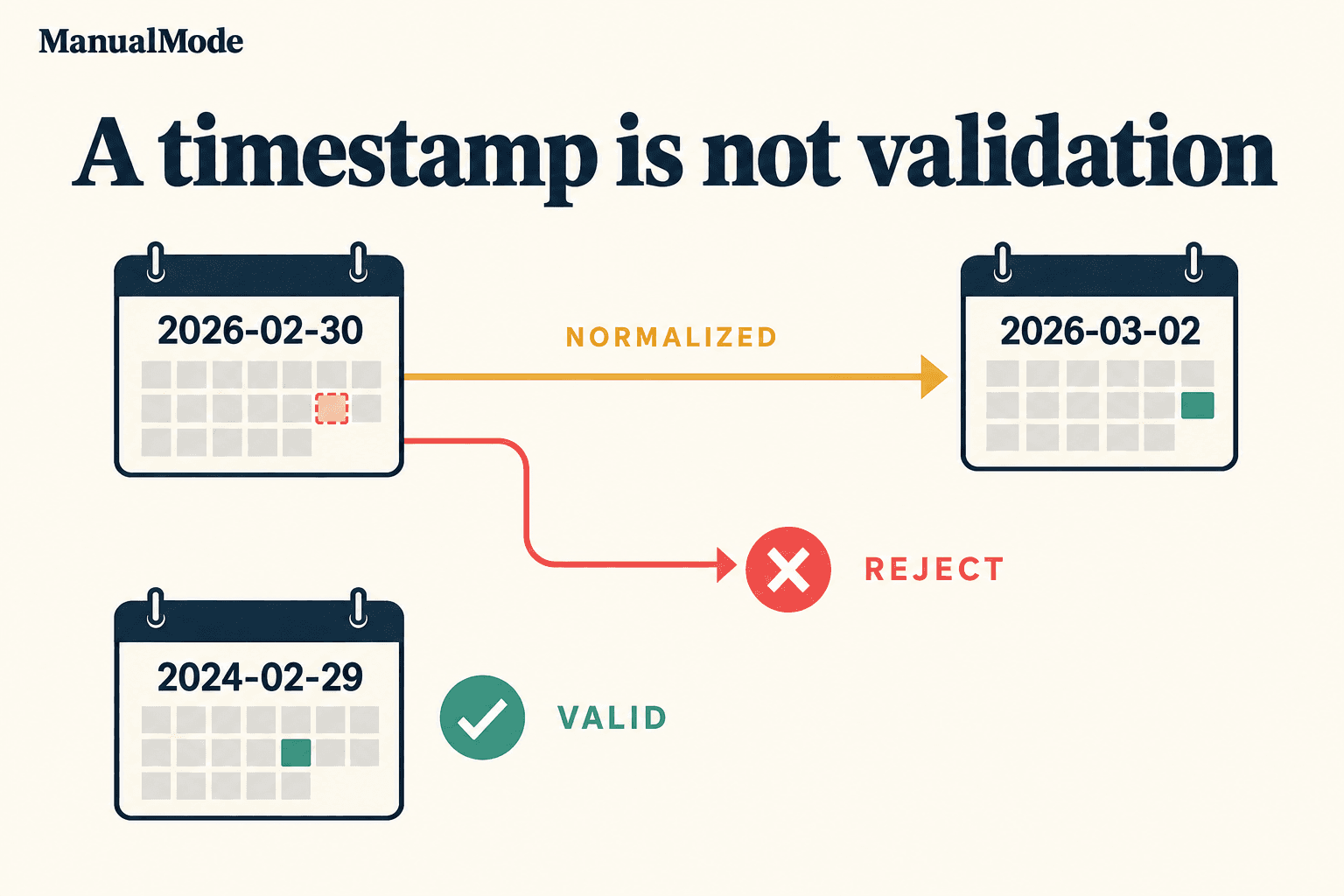
Test whether the input date exists, rather than whether JavaScript can turn its components into a timestamp. A numeric date constructor can carry an impossible day into the next month. That is useful for date arithmetic, but it can violate a form validator's contract.
In this synthetic review, an AI-generated helper accepts 2026-02-30. JavaScript normalizes those components to March 2. You will expose the mistake with independent expectations, make a small correction, and rerun the same tests. The example uses Node.js 22 built-ins in a temporary directory; no account, package install, or production access is needed.
Choose the date-only contract first
For this exercise, the helper accepts a string in exact YYYY-MM-DD form, using ordinary Gregorian calendar rules and years 1000 through 9999. It rejects impossible dates, extra whitespace, timestamps, nonstrings, and years outside that range. It returns a boolean and does not rewrite the input.
A date-only value describes a calendar day, such as a due date. It does not by itself specify a time or a timezone. Those meanings belong in your application's contract. Our use of UTC below is a way to make the component check consistent; it does not turn the submitted day into a business deadline at midnight UTC.
The year range is deliberate. JavaScript's numeric date construction treats years 0 through 99 specially. This small fixture excludes them instead of silently claiming support for every historical date. If your application needs those years, design and test that behavior separately.
Run the plausible validator against independent cases
Save the complete example as calendar-date.test.mjs and run node --test calendar-date.test.mjs:
import test from 'node:test';
import assert from 'node:assert/strict';

function validCalendarDate(input) {
  if (typeof input !== 'string' || !/^\d{4}-\d{2}-\d{2}$/.test(input)) return false;
  const [year, month, day] = input.split('-').map(Number);
  if (year < 1000 || year > 9999) return false;
  const date = new Date(Date.UTC(year, month - 1, day));
  return Number.isFinite(date.getTime());
}

test('accepts known valid dates, including a leap century', () => {
  for (const input of ['2024-02-29', '2026-03-02', '2000-02-29', '1000-01-01', '9999-12-31']) {
    assert.equal(validCalendarDate(input), true, input);
  }
});

test('rejects impossible calendar dates instead of normalizing them', () => {
  for (const input of ['2026-02-30', '2025-02-29', '1900-02-29', '2026-04-31', '2026-00-12', '2026-13-01', '2026-01-00']) {
    assert.equal(validCalendarDate(input), false, input);
  }
});

test('keeps the chosen exact shape and year range', () => {
  for (const input of [null, 20261018, '2026-2-03', '2026-02-03 ', '2026-02-03T00:00:00Z', '0099-01-01', '0000-01-01']) {
    assert.equal(validCalendarDate(input), false, String(input));
  }
});
The result is two passing tests and one failing test. The impossible-date test fails on 2026-02-30: expected false, actual true. The exact-shape and known-valid cases pass, so they would not reveal the defect on their own.
You can inspect the normalization directly with new Date(Date.UTC(2026, 1, 30)).toISOString(). In Node.js 22 it returns 2026-03-02T00:00:00.000Z. The month argument is zero-based: 1 means February.
The expected answers come from explicit calendar cases. Computing the expected value with the same date constructor would risk repeating the helper's assumption. A test that only checks for a finite timestamp would pass while accepting the wrong day.
Compare the resulting components with the input
Keep the tests unchanged. Replace only the helper with this version:
function validCalendarDate(input) {
  if (typeof input !== 'string' || !/^\d{4}-\d{2}-\d{2}$/.test(input)) return false;
  const [year, month, day] = input.split('-').map(Number);
  if (year < 1000 || year > 9999) return false;
  const date = new Date(Date.UTC(year, month - 1, day));
  return date.getUTCFullYear() === year
    && date.getUTCMonth() === month - 1
    && date.getUTCDate() === day;
}
Rerun the command. All three tests pass. Construction can still normalize out-of-range components, but a changed year, month, or day now makes the result false. February 30 becomes March 2 internally, so its resulting month and day do not match the submitted components.
The century cases help distinguish a calendar rule from a simple every-four-years shortcut: February 29 is valid in 2000 and invalid in 1900. The fixtures also include month zero, month thirteen, day zero, an April overflow, and exact formatting failures.
To challenge the regression, temporarily replace the final component comparison with return Number.isFinite(date.getTime());. The impossible-date test must fail again. Restore the comparison and verify the green result before proceeding.
Keep timezone checks consistent
This helper constructs with Date.UTC and reads with getUTCFullYear, getUTCMonth, and getUTCDate. Mixing UTC construction with local getters would make the answer depend on the process timezone. A UTC midnight can fall on the previous local calendar day.
The corrected fixture was run under TZ=UTC, TZ=America/Los_Angeles, and TZ=Asia/Tbilisi with Node.js 22. Each run passed all three tests. You can run the same matrix locally, for example with TZ=America/Los_Angeles node --test calendar-date.test.mjs in a shell that supports environment assignments.
That matrix checks this date-only helper. It does not test daylight-saving transitions for scheduled events, timezone database updates, a user's locale, or the meaning of midnight in your product. Keep those requirements in separate tests at the boundary where they matter.
Test the boundary that receives the date
A local helper test is one piece of evidence. In a real repository, find the form, API handler, import job, or database adapter that consumes the value. Confirm that it actually invokes the intended validation and preserves the chosen date-only representation.
- Does an invalid day produce the documented validation error before any write?
- Does the boundary reject or explicitly normalize whitespace and alternate formats?
- Can a client and server disagree because they use different parsing rules?
- Does a database or serialization step convert the value into an unintended timestamp?
- Are minimum, maximum, past, and future dates separate business constraints?
Choose expected outcomes from the application contract. A date can exist on the calendar and still be ineligible for a booking or deadline. Conversely, a product that intentionally allows flexible input needs a defined normalization policy; this strict helper is not automatically the right interface.
Bound the conclusion and leave a review note
These tests cover a small, strict Gregorian date-only contract. They do not prove correctness for every input, validate time-of-day strings, parse locale-specific dates, handle other calendars, or demonstrate the behavior of a production endpoint. This article uses numeric UTC components rather than depending on how a runtime parses an invalid date string.
The ECMAScript Date.UTC algorithm specifies the numeric construction used here. MDN's Date.UTC reference explains component normalization and the special handling of small years. The Node.js 22 test runner documentation describes the runner. Sources checked October 18, 2026.
A useful review note names the accepted shape and year range, the failing input, the observed rollover, the independent expectation, the corrected test result, and the untested integration boundary. That is more informative than saying that the date parser looks safe.
Make one date bug a manual coding rep
Before asking an agent for a replacement library or a larger rewrite, trace one impossible input through the existing helper yourself. Write its expected answer, run the smallest regression, and explain why the correction rejects it. Keep broader date requirements visible rather than assuming the small fix covers them.
ManualMode's free code review exercise uses synthetic patches; it does not run this validator or inspect your repository. Three Gym reps and one Project rep are free after signup. For a bounded Project task in your own code, a local regression can support the work you chose to do manually, with raw project source staying local by default.
Start with evidence
Calibrate with three Gym reps, then verify one real Project task.
3 Gym + 1 Project reps free. Create an account; no card or public review required.