Security review
Vibe coding security checklist: what to check before you ship
Check an AI-built app for exposed secrets, missing ownership checks, open database rows, invented packages, and unbounded endpoints, with a runnable Node.js test.
Practice review
Review two synthetic patches in about 5 minutes.
No account. Review-only: it does not inspect your own code.
Try the review exercise9 min read · Updated October 20, 2026
The short checklist
Before you ship an app built mostly by prompting, check who can read what, which secrets reach the browser, and which code you never read. These seven checks cover the failures that are cheapest to find before launch and expensive after it.
- Secrets: no secret key appears in client code, the built bundle, or the repository history.
- Ownership: every endpoint that loads a record by ID checks that the signed-in user may access that record.
- Database access: if the browser talks to the database directly, row-level rules exist and deny by default.
- Input: queries are parameterized and server-side validation exists for every field the client can send.
- Packages: each dependency the assistant added exists, is the one you meant, and has no known critical advisory.
- Cost and abuse: sign-in, sign-up, and any endpoint that calls a paid API have rate limits or quotas.
- Leftovers: debug routes, verbose errors, test accounts, and admin shortcuts are gone from production.
This is a pre-launch review, not a penetration test or a compliance audit. If the app handles payments, health data, or other people's private information, get a security review from someone qualified before launch.
Secrets: assume anything public is public
Frameworks deliberately expose some environment variables to the browser. In Next.js, a variable prefixed with NEXT_PUBLIC_ is inlined into the JavaScript sent to every visitor; in Vite, the prefix is VITE_. If an assistant moved a secret key into one of those to make an error disappear, the key is now public.
Search the built client output, not only the source, because a build can inline values from your environment:
# Run after a production build, from the project root.
# Adjust the folders to your framework's client output.
grep -rIl -E "sk_live_|sk-ant-|sk-proj-|sb_secret_|BEGIN (RSA |EC )?PRIVATE KEY" \
  .next/static dist build 2>/dev/null
The prefixes cover common Stripe, Anthropic, OpenAI, and Supabase secret keys and private key files. No match is not proof that nothing leaked; a custom key has no recognizable prefix. Also search the repository history, because deleting a committed key does not remove it from earlier commits. A key that was ever public needs rotation at the provider, not just removal from the code.
Publishable keys, such as a Stripe publishable key or a Supabase anon key, are designed to be visible. They are only safe when the server side and database rules do the real access control, which the next two checks cover.
Ownership: test the request a stranger would make
The most common serious bug in generated API code is checking that a user is signed in but not that the record belongs to them. OWASP lists it first among API risks as broken object level authorization. Any signed-in user who changes an ID in the URL can read someone else's data.
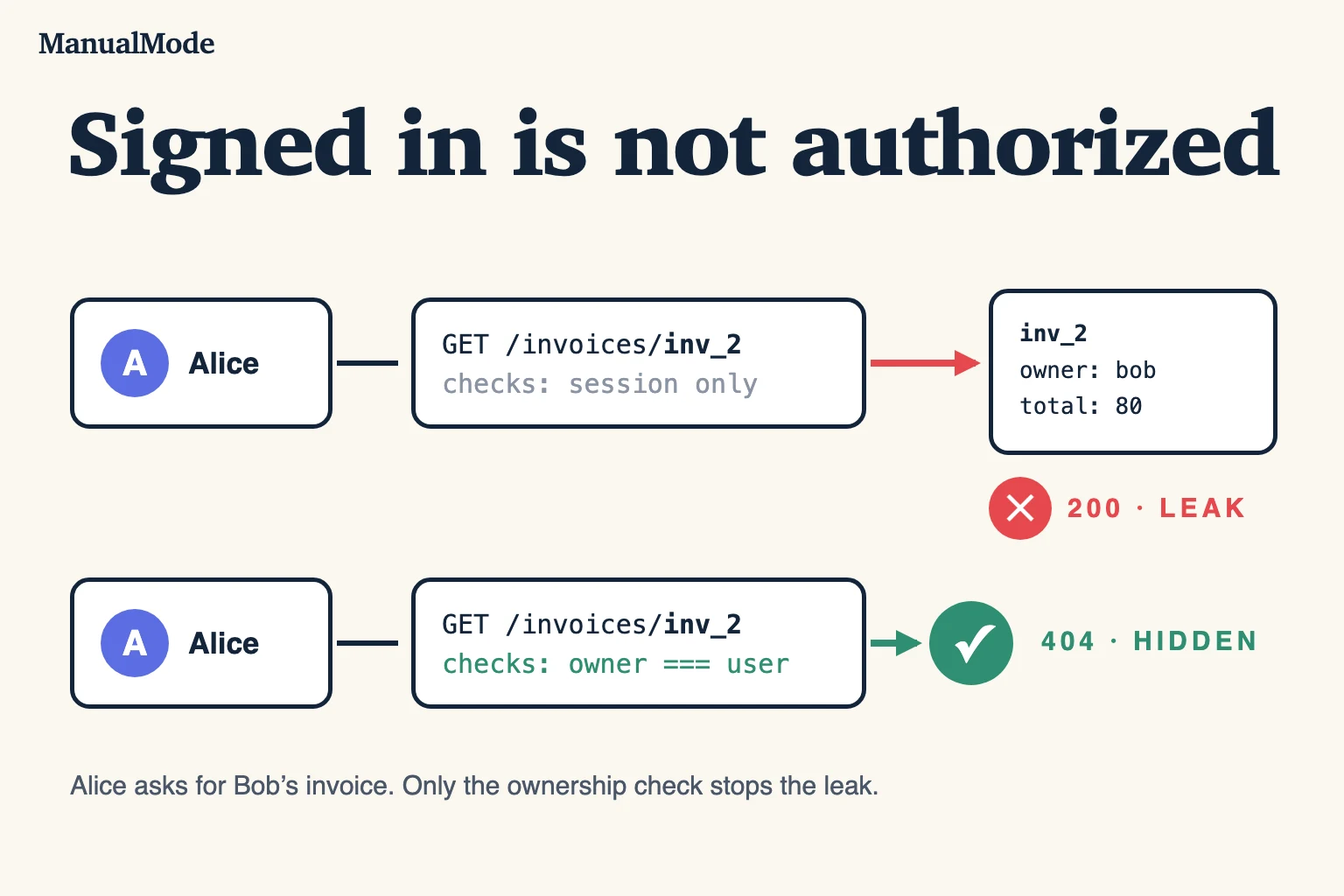
Here is a synthetic example. Save it as invoice.test.mjs and run node --test invoice.test.mjs:
import test from 'node:test';
import assert from 'node:assert/strict';

const invoices = new Map([
  ['inv_1', { id: 'inv_1', ownerId: 'alice', total: 120 }],
  ['inv_2', { id: 'inv_2', ownerId: 'bob', total: 80 }],
]);

// Plausible AI-generated handler logic: it checks sign-in, not ownership.
function getInvoice(session, invoiceId) {
  if (!session?.userId) return { status: 401 };
  const invoice = invoices.get(invoiceId);
  if (!invoice) return { status: 404 };
  return { status: 200, body: invoice };
}

test('rejects a request without a session', () => {
  assert.equal(getInvoice(null, 'inv_1').status, 401);
});

test('returns an invoice to its owner', () => {
  const result = getInvoice({ userId: 'alice' }, 'inv_1');
  assert.equal(result.status, 200);
  assert.equal(result.body.id, 'inv_1');
});

test('hides another user\'s invoice', () => {
  const result = getInvoice({ userId: 'alice' }, 'inv_2');
  assert.equal(result.status, 404);
  assert.equal(result.body, undefined);
});
Two tests pass and one fails: Alice receives Bob's invoice with status 200. The two passing tests are the ones a quick demo naturally covers, a signed-out request and an owner reading their own data. Neither involves a second user, so neither can catch the defect.
Replace only the handler with this version and rerun:
function getInvoice(session, invoiceId) {
  if (!session?.userId) return { status: 401 };
  const invoice = invoices.get(invoiceId);
  if (!invoice || invoice.ownerId !== session.userId) return { status: 404 };
  return { status: 200, body: invoice };
}
All three tests pass. Returning 404 instead of 403 avoids confirming that another user's invoice exists; either can be correct if your contract says so. In a real app, run the same three requests against the actual endpoint with two test accounts, and repeat it for update and delete, not only read. The example uses only Node.js built-ins and was run on October 20, 2026.
Database access from the browser needs deny-by-default rules
Some stacks let client code query the database directly with a public key. Then the database rules are your authorization layer. Supabase's documentation tells you to enable row level security on every table in an exposed schema; without it, a table can be read and written by any role that has a grant on it. With row level security enabled and no policies yet, the public key can access no rows until you add policies.
- List every table the client can reach and confirm row level security is enabled on each one.
- For each policy, write which user may read, insert, update, and delete which rows, then test each case with a second account.
- Keep service or admin keys on the server only. They bypass row rules by design.
Firebase, other hosted databases, and storage buckets have their own rule systems. The question is the same: what can an anonymous visitor, or a different signed-in user, read or change?
Input, packages, and cost limits
Input. Look for database queries built by joining strings with user input. Replace them with parameterized queries or your query builder's placeholders. Validate request bodies on the server; client-side validation improves the form, it does not protect the endpoint.
Packages. Assistants sometimes suggest a package name that does not exist or resembles a popular one. An attacker can register that name. Before installing a suggested dependency, confirm it:
# A package an assistant suggested: does it exist, and since when?
npm view some-suggested-package name version time.created repository.url

# Known advisories for what is already installed
npm audit --omit=dev
A very recent creation date, a missing repository, or a name one character away from a well-known package is a reason to stop and check. npm audit reports known advisories; it does not detect a malicious package that has no advisory yet.
Cost. An endpoint that calls a paid AI or email API on every request is a bill anyone can run up. Require sign-in where possible, add per-user and per-IP limits, set a spending cap at the provider, and alert on unusual usage.
Read the code that guards the data
You do not have to read every generated line before launch. Read the lines that decide access: authentication middleware, every handler that loads a record by ID, database rules, payment webhooks, and file upload handling. Those are short, and they are where one missing condition exposes everyone's data.
For each one, write the contract in a sentence, then test it with the request a stranger would send. The AI code review checklist covers the general review method, and the AI code review prompt can point a model at the same questions before you verify its findings. Sources: OWASP API1:2023, Next.js environment variables, Vite env variables, Supabase row level security, and the OWASP query parameterization cheat sheet, checked October 20, 2026.
Build the review habit, not only the checklist
A checklist helps once. Spotting a missing ownership check in a diff you did not write is a skill, and it weakens if every review is delegated back to the tool that wrote the code.
ManualMode's free code review exercise gives you two synthetic AI-generated patches to approve or reject, with no account or code upload. It does not scan your app. Three Gym reps and one Project rep are free after signup; a Project rep can be a bounded fix from your own repository, with raw source staying local by default.
Start with evidence
Calibrate with three Gym reps, then verify one real Project task.
3 Gym + 1 Project reps free. Create an account; no card or public review required.